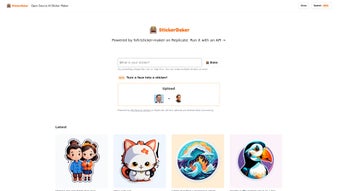

Download StickerBaker – AI Sticker Generator, Free & Open‑Source Tool
Overview & Key Features of StickerBaker
StickerBaker is a free, open‑source AI‑driven sticker generator that turns plain text prompts into ready‑to‑use PNG or SVG graphics. Built on the Replicate platform, the service runs entirely in the cloud, meaning users never need to install heavyweight design software or manage GPU drivers. The core idea is simple: type a description such as “a smiling avocado wearing sunglasses,” select a visual style, and let the diffusion model render a high‑resolution 2‑D sticker in seconds.
Because the source code lives on GitHub under an MIT license, developers can inspect, fork, and contribute to the engine, while ordinary creators enjoy a clean web UI that works on any modern browser. The project is continuously updated by a global community, ensuring the underlying model stays current with the latest generative‑AI advances. This combination of accessibility, transparency, and rapid iteration makes StickerBaker a compelling choice for anyone who wants to add custom graphics to chats, social media posts, marketing assets, or even printable merchandise without the learning curve of traditional vector tools.
- Natural‑Language Prompting: Convert simple or detailed text descriptions directly into visual stickers.
- Instant Preview & Download: View a thumbnail instantly and download the final image as PNG (raster) or SVG (vector).
- Open‑Source Repository: Full source code on GitHub encourages community contributions and complete transparency.
- Cross‑Platform Web UI: No installation required; works on Windows, macOS, Linux, Android, and iOS via any modern browser.
- High‑Resolution Output: Generate stickers up to 1024 × 1024 px, suitable for both screen use and print.
- Style Library: Choose from preset artistic styles such as cartoon, flat‑design, pixel‑art, or hand‑drawn.
- Batch Generation: Submit a list of prompts to produce multiple stickers in a single session.
- Community Gallery: Browse and remix stickers created by other users for inspiration.
- Secure Server Processing: All image generation occurs on isolated Replicate servers, keeping prompts private.
- Continuous Model Updates: Regular fine‑tuning improves detail, color fidelity, and style consistency over time.
Installation, Usage & Compatibility
Getting Started – No Download Needed
The quickest way to start creating stickers is through StickerBaker’s hosted web interface. Visit the official page, sign in with a GitHub or Google account, and you’ll be presented with a simple prompt box and style selector. For power users who prefer a self‑hosted solution, the GitHub repository includes Docker‑based deployment instructions and a Python script. After cloning the repo, install the required dependencies (Python 3.9+, Docker, and a Replicate API token), then run docker compose up to launch a local server. This setup mirrors the cloud experience but gives you full control over data privacy and compute resources.
Step‑by‑Step Sticker Creation Process
1. Enter a Prompt: Type a clear description, e.g., “a neon‑glow cyberpunk cat wearing headphones.”
2. Select a Style (Optional): Pick a visual style from the dropdown to guide the AI’s aesthetic.
3.
Generate: Click the “Bake” button. Within a few seconds, a preview thumbnail appears.
4. Refine: Adjust the prompt or style and regenerate until the result matches your vision.
5.
Download: Choose PNG for raster use or SVG for scalable vector output, then save to your device.
The entire workflow typically takes under a minute, making StickerBaker ideal for rapid prototyping or on‑the‑fly creative bursts.
Supported Environments: The web UI runs on Chrome, Firefox, Edge, and Safari, and is fully functional on desktop operating systems (Windows 10/11, macOS Ventura, major Linux distributions) as well as mobile platforms (Android 13, iOS 17). The optional Docker deployment works on the same OS families, ensuring consistent performance whether you’re on a laptop, tablet, or server.
Pros, Cons & Frequently Asked Questions
Pros
- Completely free and open‑source, removing any cost barrier for individuals or teams.
- AI‑driven generation eliminates the need for graphic‑design expertise.
- Web‑based interface works on any device with a modern browser.
- High‑resolution PNG and scalable SVG outputs suit both digital and print projects.
- Active community provides regular updates, new styles, and quick bug fixes.
Cons
- Limited to 2‑D stickers; does not support 3‑D models or animations.
- Complex prompts may require several iterations to achieve the desired look.
- Hosted version depends on Replicate’s server uptime and API quota.
- Local Docker setup demands basic knowledge of containers and API tokens.
- Stylistic control, while flexible, is not as granular as professional vector tools like Adobe Illustrator.
FAQ – Your StickerBaker Questions Answered
Is StickerBaker really free?
Yes. Both the hosted web version and the source code on GitHub are completely free. The only optional expense is the Replicate API fee if you exceed the free usage tier, which most casual users never do.
Do I need an internet connection?
For the cloud‑hosted UI, an internet connection is required because the AI runs on remote servers. If you run the Docker version locally, you can generate stickers offline after the initial model download.
Can I use StickerBaker for commercial projects?
Absolutely. The MIT license applied to the repository permits commercial use, provided you give appropriate attribution as outlined in the license file.
What image formats are available for download?
StickerBaker offers PNG for raster stickers and SVG for vector‑based output, giving you flexibility for screen‑based sharing or high‑quality print production.
How can I contribute to the project?
Visit the GitHub repository, fork the project, and submit pull requests. Contributions such as new style presets, UI enhancements, or documentation improvements are warmly welcomed by the community.
Conclusion – Start Baking Your Own Stickers Today
StickerBaker brings together cutting‑edge generative AI, open‑source transparency, and a frictionless web experience, making custom sticker creation accessible to anyone—from casual messengers to professional marketers. Its ability to deliver high‑resolution PNG and scalable SVG files in seconds eliminates the need for bulky design suites, while the style library and batch generation features keep workflow efficient for larger projects. Because the code is publicly available under an MIT license, you can trust the security of the platform and even tailor it to specific brand guidelines if desired. Whether you’re looking to spice up a Slack channel, add a unique badge to a Discord server, or design eye‑catching marketing assets, StickerBaker provides a fast, free, and secure solution.
Download StickerBaker now and unleash your creativity—one prompt at a time.
StickerBaker delivers an impressive blend of ease‑of‑use and creative flexibility. The free, open‑source model encourages experimentation without financial risk, and the quick generation time keeps workflow momentum high. While the tool is currently limited to 2‑D stickers, the rich style library and community support more than compensate for this narrow focus. Overall, it earns a solid 4.6 out of 5 for accessibility, output quality, and community involvement.



.png)



